According to Salesforce research, 75% of customers have recommended a company because of excellent customer service.
Delivering that service is getting harder. 81% of agents say customers expect a more personal touch than before, and 26% say they lack context about the customer’s situation.
Modern call center technology gives agents that context. It shows the customer’s history the moment a call connects, and AI can help write call summaries. An outdated system leads to longer wait times and higher operating costs.
That’s why we put together this list of important factors to guide you when choosing call center technology.
Quick summary: Most call center platforms list similar features, so compare them on how they perform with your own call volume and existing systems. Shortlist 2 or 3 vendors, test them with real agents for 30 to 60 days, and choose the one with the lowest three-year total cost that covers your must-have features.
What is call center technology?
Call center technology is the software your team uses to handle customer calls. It connects each caller to an agent through a phone system. It can be either a PBX that routes calls to desk phones or VoIP that runs calls over the internet on a computer or mobile device.
Before the call reaches anyone, interactive voice response (IVR) greets the caller and automatic call distribution (ACD) sends the call to the agent best suited to the issue.
When the agent picks up, the software pulls the customer’s history from your CRM and records the conversation, so the agent can solve the issue without asking the customer to repeat information.
Every call also transfers data to performance reports, which can show managers where agents need support.
The 9 factors at a glance
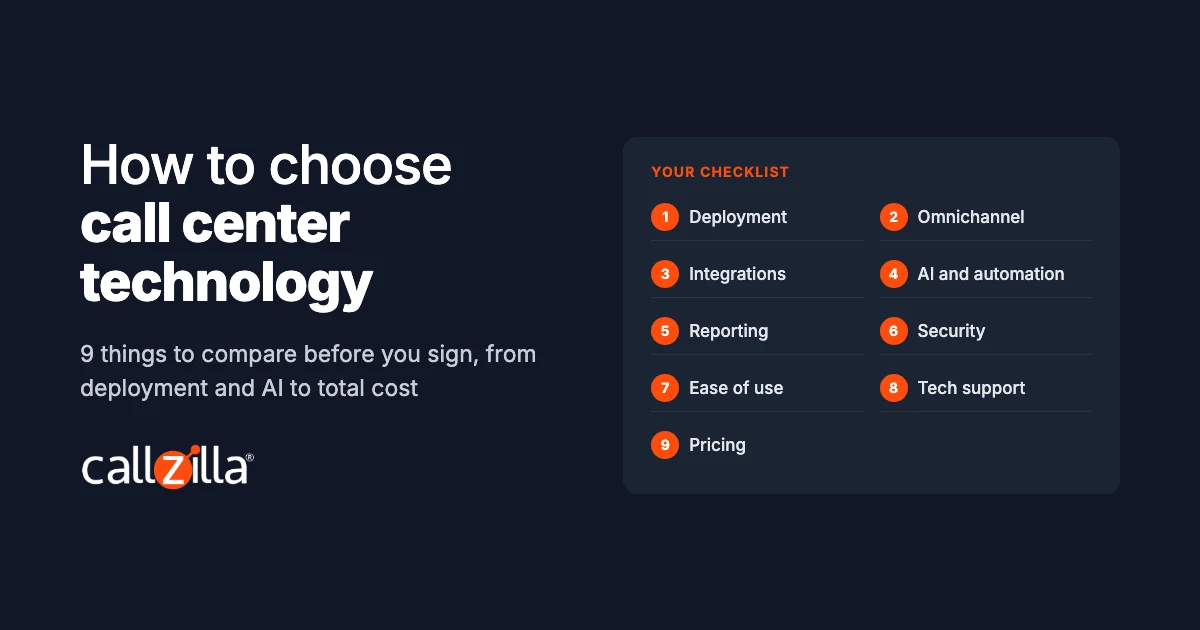
| Factor | What to check | Ask the vendor |
|---|---|---|
| 1. Deployment model | On-premises, hosted or cloud (CCaaS) | What is the total cost of each option for our team size? |
| 2. Omnichannel support | Calls and digital messages in one agent desktop | Can an agent see the chat history when the customer calls? |
| 3. Integrations | Ready-made CRM and ERP connectors, open APIs | Is there a native integration with our exact systems? |
| 4. AI and automation | Agent assist, call summaries, knowledge search | Can you demo this feature on our real call scenarios? |
| 5. Reporting and analytics | Custom KPI dashboards, real-time and historical reports | Which of our KPIs are covered out of the box? |
| 6. Security and compliance | HIPAA, PCI DSS, GDPR, encryption, redaction | Which certifications do you hold and where is our data stored? |
| 7. Ease of use | Clear layout, short learning curve, OS support | Can our team change routing rules without paid services? |
| 8. Technical support | SLA uptime, repair times, support hours and language | Will you commit uptime numbers in writing? |
| 9. Pricing model | Per-user subscription vs perpetual license, add-on fees | What is our first-year and three-year total cost? |
9 Things to Look For When Choosing the Right Technology for a Modern Call Center
1. Deployment model
Call center software comes in three main deployment models: on-premises, hosted, and cloud-based.
On-premises
With this deployment model, you own the hardware. Your in-house IT team also manages the platform and the servers behind it. Call recordings take up storage space, so your team also chooses the drives those servers run on, such as SSD or NVMe drives.
This model may have a higher upfront cost, but it gives you full control over your data and a lower per-agent cost.
That trade-off suits teams with strict compliance rules or existing infrastructure they aren’t ready to retire.
Hosted
Hosted works as a middle ground for teams that want to stop managing servers but aren’t ready to move fully to the cloud.
On a hosted deployment model, a third party runs the software on its own off-site servers.
Because the provider maintains the servers, your upfront cost can be less than on-premises. However, you may have less flexibility when customizing the system. For example, some integrations, such as AI features, may require custom development.
Hosted platforms can also support remote agents, as long as the setup allows internet access.
Cloud-based
Cloud platforms run on the provider’s infrastructure, so you don’t need to buy servers or maintain them in-house.
Cloud platform providers typically offer their software through a subscription model called contact center as a service (CCaaS), with pricing based on the number of agents.
You can also add seats when call volumes rise and remove them when demand drops. Before signing up, check how per-agent pricing changes as your team grows.
Pro tip: Cloud doesn’t always mean cheaper. Per-agent subscription fees add up year after year, so compare the total cost of each option over three years to see which one fits your budget.
2. Omnichannel support
In Microsoft’s Global State of Customer Service research, 49% of consumers surveyed in 2019 used three to five channels to contact customer service. If each channel is managed in a separate tool, agents can’t see what the customer’s previous interactions were.
An omnichannel support system brings phone calls and digital messages into one agent desktop. When a customer moves from web chat to a phone call, the agent can see the earlier conversation and pick up where it left off. This prevents repeated questions and saves agents time they would otherwise spend gathering information the customer has already provided.
3. Third-party integrations
Make sure your call center software connects to the systems your team uses daily. Your team depends on these tools, so poor integration can force agents to switch between applications or enter the same information twice.
One essential integration is customer relationship management software (CRM), which stores customer information and gives agents the context they need to handle inbound inquiries.
If your call center representatives handle orders and billing, they might need direct access to data from your Enterprise Resource Planning (ERP) or order management system. Ask each vendor whether the platform has a ready-made integration with your specific ERP system.
And last but not least, if you need a custom integration, ask whether the platform provides APIs or other ways to connect your systems. Custom development can cost extra, so confirm the cost before signing a contract.
4. AI and automation
AI is now widely used in contact centers, but in practice, its application is limited to a few use cases.
Research suggests that AI adoption and its benefits vary by application. For example, a 2026 survey of 815 enterprise executives by Ryan Strategic Advisory and TELUS Digital found that 56% of enterprises planned to invest in AI copilots for real-time agent assistance, 55% in chatbots and virtual assistants, and 51% in AI-powered knowledge management and search. However, only 36% were already using or piloting real-time agent assistance, and 34% were using AI-powered knowledge management and search.
AI can still help with specific tasks, such as suggesting answers to agents during calls or drafting call summaries. These tools are worth considering when they solve a clear problem, but for them to be useful, they need to fit your team’s workflow.
Before investing in AI, consider what you need to automate and whether AI is the right solution. Ask vendors to demonstrate the specific feature you need using realistic call scenarios, then test whether it helps your team before rolling it out more widely.
5. Reporting and analytics
Good reporting helps you spot service problems early and fix them before they affect your operations.
Every business tracks different KPIs, so look for a platform that lets you build dashboards around your own. Common examples include first call resolution (FCR), average handle time (AHT), call abandonment rate, average queue time, and customer satisfaction (CSAT).
Beyond KPI dashboards, check for these reporting features:
- Real-time dashboards for tracking agent availability and queue lengths as demand changes
- Historical reports for spotting performance trends and measuring the impact of process changes
- Live call monitoring for coaching agents through difficult calls as they happen
- Agent-level reports for seeing who needs coaching and on what
Before the demo, send the vendor your KPI list and ask them to show which reports cover each one out of the box. For any KPI that needs custom development, ask what the work costs and how long it takes.
6. Security and compliance
The software you choose must comply with the laws and regulations in your industry. If your call center processes personal data, a breach puts your customers at risk and exposes your business to fines and a loss of trust.
A healthcare call center needs HIPAA compliance for patient data. Any team that takes card payments by phone needs PCI DSS compliance, and teams serving customers in the EU need GDPR. If the platform falls short of these standards, your business still carries the compliance risk.
Look for end-to-end encryption and automatic redaction of sensitive details in call recordings and transcripts, so card numbers and health details don’t appear in files your team replays.
Ask which contact center certifications the vendor holds and where it stores your data, because you’ll need both answers when auditors or customers ask how you protect their information.
7. Ease of use
An intuitive interface shortens the time agents spend with each caller, because they don’t waste time searching menus for information.
Look for a clear layout with fast access to contact history, and common actions such as transfers and notes that take only a few clicks. A short learning curve helps new hires become effective faster. Your team should also be able to change settings such as routing rules on its own, so small adjustments don’t require the vendor’s paid professional services.
Ask the vendor how it will train agents on basics such as transferring a call and placing a caller on hold.
Software won’t teach agents empathy or how to calm a difficult caller, so budget separate training time for soft skills.
For remote teams using personal computers, confirm that the contact center software supports your agents’ operating systems. Although Windows is common, some agents may use Macs. If the platform doesn’t support macOS, ask the vendor about alternatives before exploring workarounds. Some Intel-based Macs can run Windows through Apple’s Boot Camp utility, but newer Macs don’t support it. This article about Boot Camp alternatives for Mac explores the topic in more detail.
Keep in mind that workarounds add another layer of software for your IT team to manage, so think about how to support your team’s devices without creating unnecessary maintenance work.
8. Technical support
The quality of the vendor’s technical support directly affects your call center’s operations.
The service level agreement (SLA) should state guaranteed uptime and repair times for critical issues. It should also say what you get when the vendor misses those targets, such as service credits or an exit right.
Support levels vary by vendor. Some offer only email support, and others assign a dedicated account manager, so confirm which one you get and whether support covers the hours and language your team works in.
Ask what support looks like after go-live, including response times for critical issues. If a vendor won’t commit uptime numbers in writing, treat its uptime claims as marketing.
9. Pricing models
Most vendors charge per user per month, billed monthly or annually, with discounts for longer contracts. Some offer a perpetual license instead, which gives you permanent access to the software for a one-time fee.
A cheap plan can leave out features you need, and a high price doesn’t guarantee quality.
Beyond the license fee, add up:
- Implementation and setup fees
- Integration work
- Agent training
- Hardware upgrades
- Premium modules, such as AI or workforce management
- Ongoing support
Ask each vendor for a first-year and three-year total cost, broken down by category. A lower headline price can cost more over three years once implementation and integration land on the invoice.
How to Compare Vendors Before You Sign
Once you know which features matter to your call center, the next step is to shortlist the vendors that deliver them.
Follow these six steps to compare vendors based on their real capabilities, and not sales demos:
- Define your requirements first: Document your call volume in your busiest month and the headcount you expect in 12 and 24 months. Share these numbers with each vendor and ask them to apply their platform to your operation, so the proposal reflects your volumes instead of a generic demo.
- Shortlist 2 or 3 vendors: Keep only the platforms that cover your must-have features and proven integrations.
- Run a 30- to 60-day pilot: Give a small group of real agents real tasks, such as building an IVR menu and pulling a customer record from your CRM during a live call. Track how the platform affects AHT and FCR.
- Check references: Ask for references from companies in your industry, and compare ratings on G2 and Gartner Peer Insights.
- Review the product roadmap: Ask what the vendor plans to release over the next 12 to 18 months and whether customer feedback shapes those plans.
- Score every vendor on the same criteria: Give the most weight to fit with your call volumes and to total cost of ownership.
Final Notes
When choosing call center technology, start with the problems your agents face every day.
AI deserves a place in that evaluation, but it shouldn’t be the deciding factor. Look for specific tasks it can help your teams with.
If you’re exploring ways to bring AI into your customer interactions, check out Callzilla’s conversational AI solutions. And if you would rather hand the phones to a team that already runs this technology every day, read our guide on how to choose a call center outsourcing company.
Frequently Asked Questions
What should you look for in call center technology?
Compare nine things: the deployment model (on-premises, hosted or cloud), omnichannel support, integrations with your CRM and other systems, AI and automation, reporting and analytics, security and compliance, ease of use, the vendor’s technical support, and the pricing model. Test the shortlist with real agents and choose on fit with your call volumes and three-year total cost, not on the feature list.
What is CCaaS?
Contact center as a service (CCaaS) is cloud-based call center software sold as a subscription, usually priced per agent per month. The provider runs the infrastructure, so you don’t buy or maintain servers, and you can add or remove agent seats as call volumes change.
How long does call center software implementation take?
Implementation can take anywhere from a few weeks to several months, depending on your setup’s complexity. Ask each vendor for a timeline based on your requirements, and favor vendors that offer hands-on onboarding built around your team.
Do you still need call center software if you already use a CRM?
Yes, you do. A CRM stores customer and account data, but it doesn’t route calls or manage queues. Call center software handles those jobs and connects to your CRM through an integration, so your agents work from both systems in one view.
Can you switch platforms without disrupting live calls?
Yes, if your agreement includes a migration plan. Run the old and new systems in parallel, move one team or campaign at a time, and keep a rollback option in case something breaks. Ask the vendor to port your existing phone numbers as part of the plan and confirm the porting timeline before you set a cutover date, so customers keep reaching you on the numbers they know.

About the Author: Neal Topf